Architecture Overview
What is F5 Distributed Cloud?
F5 Distributed Cloud (xC) is a platform that helps organizations make their applications faster, more secure, and easier to manage — no matter where they run.
Whether your application is hosted in the public cloud, in a private data center, or spread across multiple environments: xC connects everything through one global platform with a single console and a unified policy engine. Instead of juggling separate tools for load balancing, WAF, DDoS, and networking, everything is consolidated in one place.
The result: faster deployments, consistent security everywhere, and significantly less operational overhead.
The Global Network (PoPs)
At the core of xC is a global network of Points of Presence (PoPs) — think of them as secure entry points distributed around the world.
When a user opens an application:
- They automatically connect to the closest PoP
- Traffic is inspected, secured, and optimized right there
- Then it is safely forwarded to the application backend
Every PoP is a full Regional Edge (RE) — not just a cache node. It can terminate TLS, apply WAF policies, mitigate DDoS attacks, and route requests to any backend, regardless of whether it runs in AWS, Azure, GCP, or on-premises.
Because the PoPs are interconnected via a private high-performance backbone (not the public internet), traffic between locations is faster and more secure than traditional architectures.
What makes this powerful:
- Users get faster response times — traffic is handled at the nearest edge
- Applications are protected before traffic reaches them — attacks are stopped at the PoP
- Organizations don’t need to build their own global infrastructure
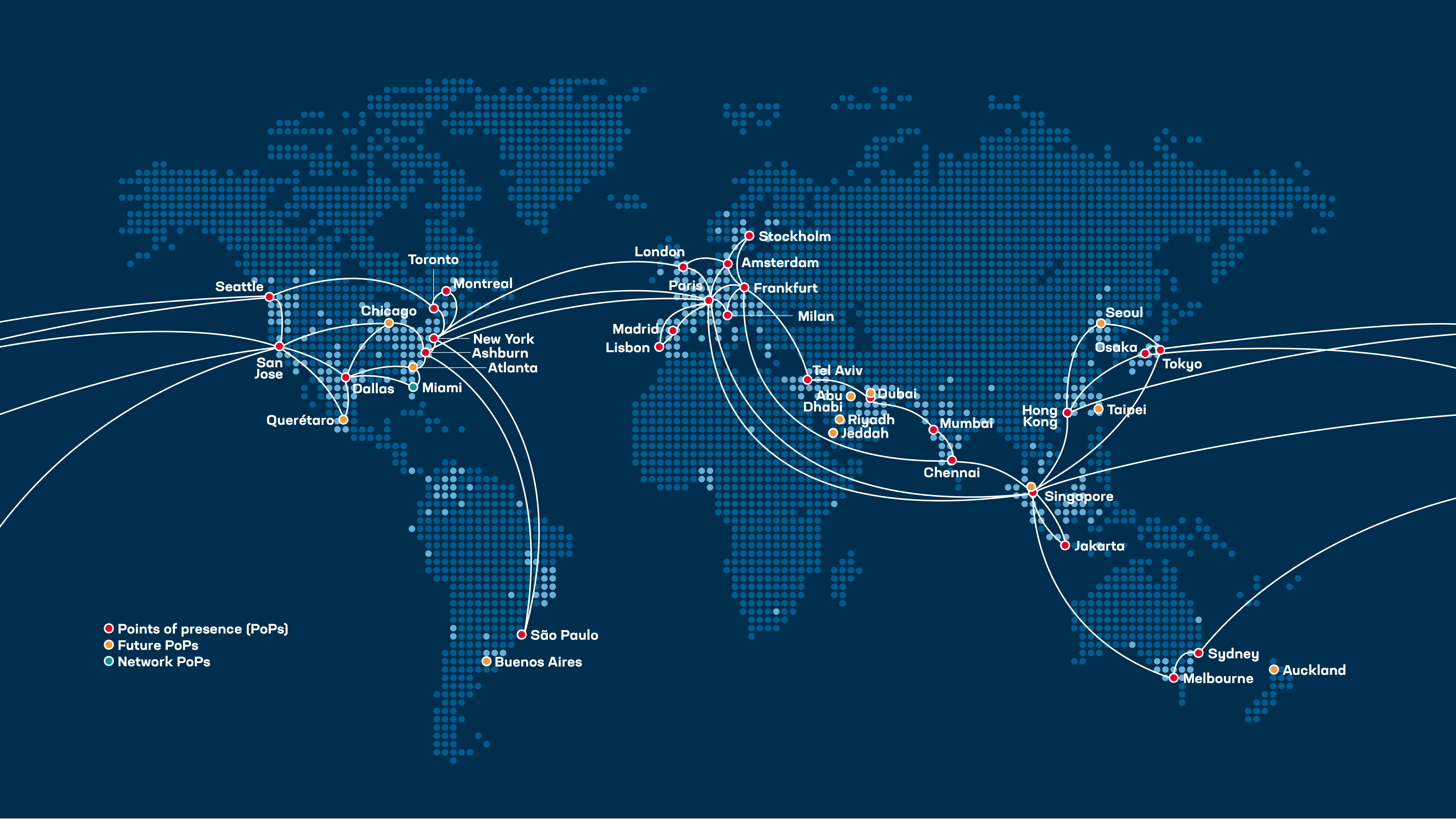
Source: f5.com/cloud
Use Cases
Fast and Secure Public Applications
Deliver websites and APIs globally without worrying about infrastructure or attacks. The F5 network handles load balancing, security, and TLS — your team focuses on the application.
Business value: better user experience, higher conversion rates, fewer outages.
Secure Access to Private Applications
Employees and partners can access internal applications securely — without complex VPN setups. A lightweight Customer Edge in your environment connects to the platform automatically.
Business value: improved security (Zero Trust approach), easier access for users, reduced operational complexity.
Simplifying Multi-Cloud and Hybrid Environments
Applications often run in different places — AWS, Azure, on-prem, or all of the above. xC connects them into one consistent platform with unified policies and networking.
Business value: less complexity, faster deployments, more flexibility.
Connecting Legacy and Modern Applications
Existing systems in data centers can be securely connected or exposed without major redesign. Modernize at your own pace while keeping existing investments protected.
Business value: protect existing investments, enable gradual modernization, reduce risk during transformation.
Three Ways to Deploy
The platform is highly flexible and adapts to your environment — not the other way around. Depending on your requirements, you can deploy in three models:
| Model | Best For | How It Works |
|---|---|---|
| SaaS | Quick wins, public-facing apps | Traffic enters and exits via the F5 Global Network. No infrastructure to manage. |
| Hybrid | Private backends, compliance | Traffic enters via the Global Network but exits through a Customer Edge (CE) into your private environment. |
| Multi-Site | East-west, edge computing | Customer Edges at multiple locations connect through the xC fabric — secure cross-site communication without VPN tunnels. |
The beauty of this approach: you can start with SaaS today and extend to Hybrid or Multi-Site tomorrow. Same console, same policies, no re-architecture required.
Putting It All Together
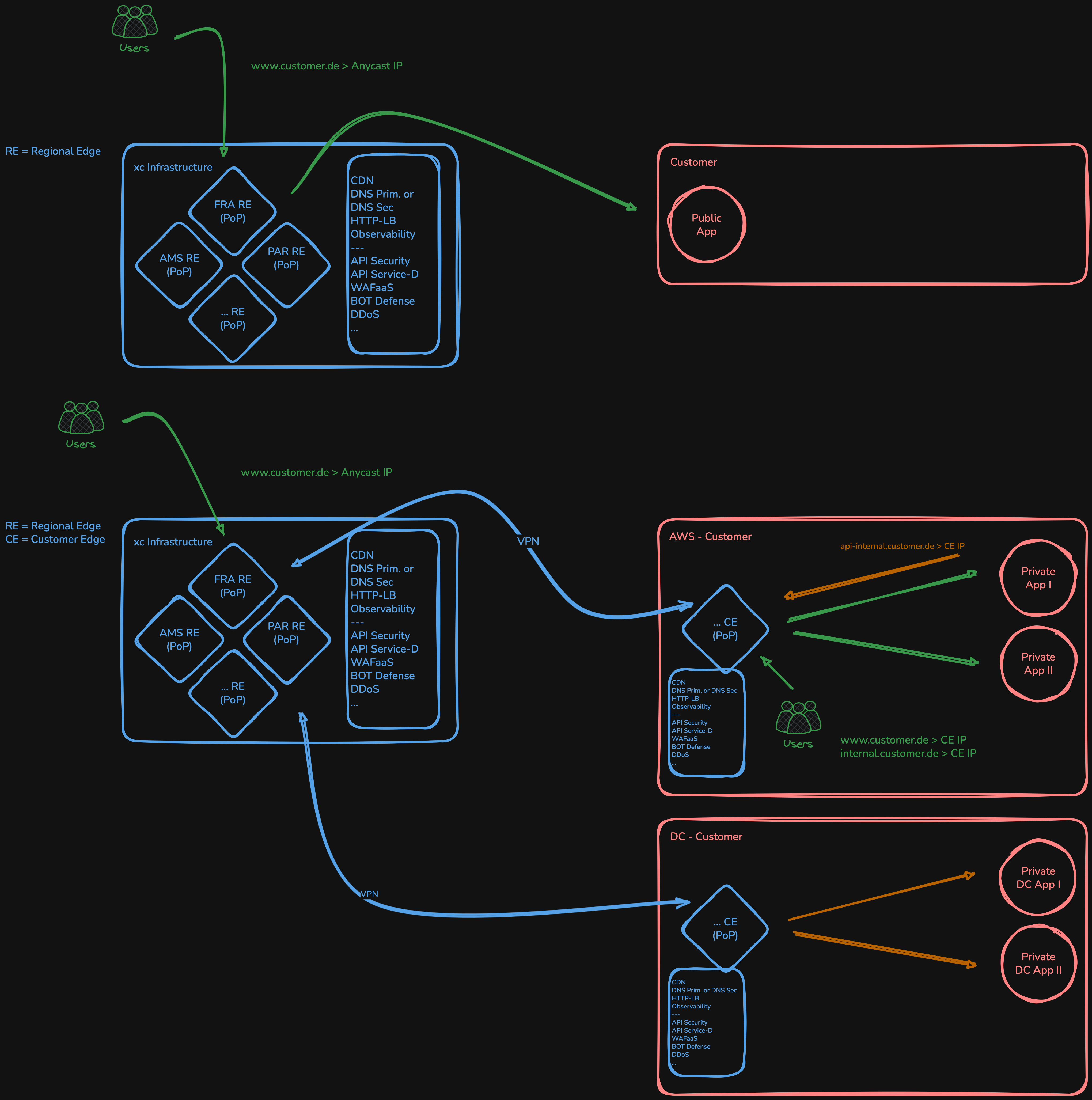
The following diagram shows how these three models work in practice:
- SaaS: Users connect directly through the F5 PoP network to applications via the internet — security and load balancing are applied at the edge, no infrastructure needed.
- Hybrid: Users connect via the PoP, which routes traffic through a private, encrypted tunnel to backend applications in your environment — no public exposure of your servers required.
- Multi-Site: Internal users and applications at any site can connect n:n with other sites — with full security capabilities (WAF, DDoS, access control) applied at every hop.
All three models are managed from one console, with centralized policies and centralized logging — regardless of how many sites, clouds, or deployment models you combine.
SaaS Model
The Fastest Path to Secure Application Delivery
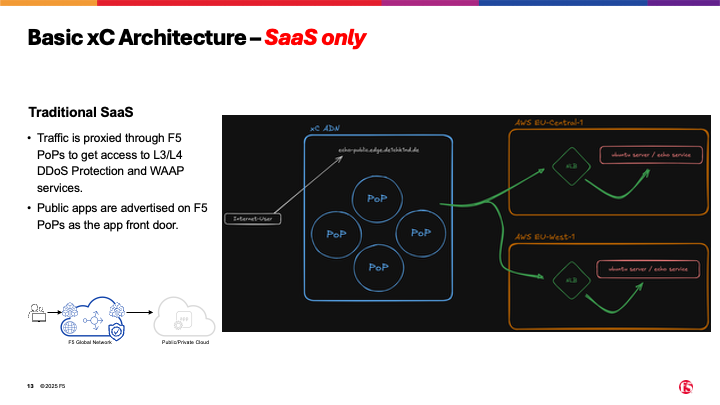
In the SaaS model, your application traffic flows entirely through the F5 Global Network. Users connect to the nearest Regional Edge (PoP), where the platform terminates TLS, applies security policies (WAF, Bot Defense, DDoS), and forwards the request to your origin server over the internet.
This is the architecture most people know from traditional CDN and WAF providers — and it works the same way here. The difference: it’s just one deployment model out of three, and it shares the same policy engine and console as the more advanced options.
When to Use This
- Public-facing web applications and APIs
- You want WAF, DDoS, and Bot protection without deploying any infrastructure
- Your origin server is reachable over the internet (e.g. behind an AWS NLB, Azure LB, or a public IP)
- You need a quick, proven setup — minutes, not weeks
What You Get
- Global load balancing with anycast across 30+ PoPs
- Web Application Firewall with managed rulesets (OWASP Top 10, CVEs, custom rules)
- DDoS mitigation at the edge, before traffic reaches your infrastructure
- TLS management with automated or custom certificates
- Observability — request logs, security events, and dashboards out of the box
Hybrid Model
Extending the Platform Into Your Private Environment
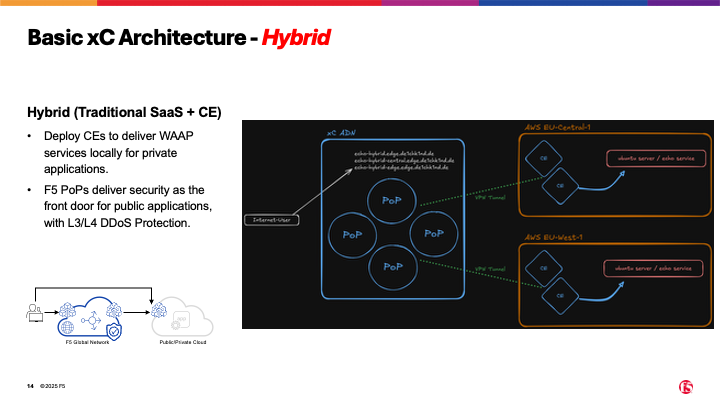
The SaaS model works great for public backends — but what if your application runs in a private subnet, behind a firewall, or in an on-premises data center? That’s where the Customer Edge (CE) comes in.
A Customer Edge is a lightweight node (virtual machine or bare metal) that you deploy in your own environment. It connects back to the F5 Global Network automatically — no inbound firewall rules, no VPN configuration, no public IPs required. Traffic enters via the Regional Edge (just like SaaS), but instead of exiting over the internet, it travels through the private xC fabric to the CE, which forwards it to your local backend.
Why This Matters
Traditional hybrid architectures require you to set up VPN tunnels, manage routing tables, and deploy separate security appliances at each location. With xC, you get all of that in a single deployment:
- One console for security policies across cloud and on-prem
- No inbound firewall rules — the CE initiates the connection outward
- Consistent WAF/Bot/DDoS protection regardless of where the backend runs
- Faster time-to-service — deploy a CE, point the load balancer to it, done
You consolidate load balancing, security, and networking into one platform. That’s less infrastructure to manage, fewer moving parts, and faster deployments.
When to Use This
- Applications in private subnets (AWS VPC, Azure VNet, on-prem DC)
- You want the same security posture for cloud and on-prem workloads
- Compliance requirements that prevent direct internet exposure of backends
- You’re looking to consolidate multiple tools (LB + WAF + networking) into one platform
Multi-Site Model
Your Private PoPs — Everywhere
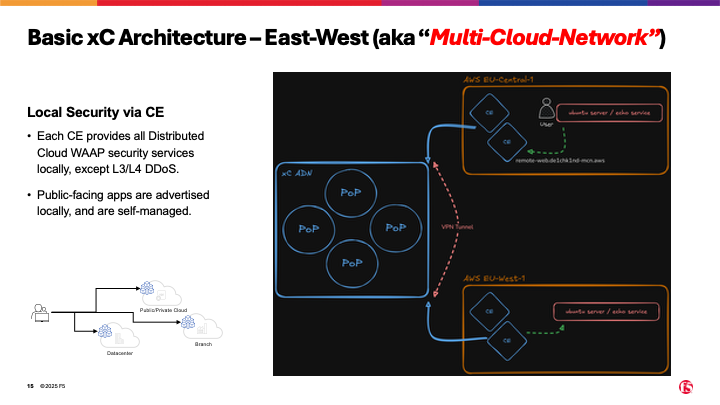
Think of the Customer Edge as more than just a gateway. In the Multi-Site model, the CE becomes a full application proxy at each location — capable of running load balancers, web application firewalls, and even container workloads directly at the edge.
In simple terms: you extend the F5 Global Network with your own private PoPs. Each CE site can terminate traffic locally, apply security policies, and communicate with other CE sites through the xC fabric — without VPN tunnels, without VPC peering, without complex routing tables.
East-West Without the Complexity
Traditionally, connecting applications across regions or data centers means setting up VPN tunnels, Transit Gateways, or MPLS circuits. Each new connection adds complexity, cost, and latency.
With xC Multi-Site, it’s different: every CE automatically connects to every other CE through the xC fabric. Want to route traffic from Frankfurt to Dublin? Just create a load balancer that points from one CE to the other — the fabric handles the rest. Encrypted, fast, and with full security policies applied.
What a Customer Edge Can Do
- Local TLS termination — no round-trip to the cloud for every request
- Local WAF and security policies — same policies as the global platform, enforced at the edge
- East-west load balancing — route traffic between sites with low latency
- Service discovery — automatically discover Kubernetes services or other endpoints
- Edge computing (vk8s) — run container workloads directly on the CE, managed from the xC console
When to Use This
- Cross-region or cross-cloud communication (east-west traffic)
- Applications that need local processing at the edge (latency-sensitive workloads)
- You want a consistent security and networking layer across all your sites
- You’re replacing or consolidating VPN/MPLS/Transit Gateway setups
Security Services
The Challenge
In the previous chapter, we explored how F5 Distributed Cloud connects applications across clouds, data centers, and edge locations. The flexibility is powerful — but it comes with a challenge: the more places you deploy, the more places you need to protect.
The reality for most organizations is not “all in the cloud” or “stay on-premises” — it’s hybrid. Applications live everywhere: in public clouds, in private data centers, at the edge. And attackers don’t care where your app runs — they look for the weakest link.
This is where F5 Distributed Cloud Security Services come in. Every security function can run on the Regional Edge (the global PoP network) or on the Customer Edge (your own sites) — or both. Same policies, same engine, same console. No matter where you deploy, your security posture stays consistent.
What’s Available
F5 Distributed Cloud offers a comprehensive set of security services — all SaaS-managed, all integrated into one platform. Here’s what’s in the toolbox:
WAF & Reverse Proxy
Every application needs a front door — and that front door should be smart. The F5 Web Application Firewall combines a full reverse proxy with AI-powered threat detection. It handles SSL/TLS termination, enforces mTLS, applies IP reputation scoring, rate limiting, and service policies — all in one layer.
What makes it different: the WAF engine is the same proven F5 technology trusted by the world’s largest enterprises, now delivered as SaaS with managed signature updates and zero-day protection via threat campaigns. No tuning, no lag — new attack patterns are blocked within hours, not days.
- AI-assisted analysis — reduces false positives and adapts to your traffic patterns
- Threat campaigns — proactive protection against emerging CVEs and zero-days
- Consistent enforcement — same WAF policy on RE and CE, managed from one console
API Security
APIs are the backbone of modern applications — and the number one attack vector. F5 Distributed Cloud protects APIs you already know about and helps you find the ones you don’t.
Import your OpenAPI/Swagger specification, and the platform automatically validates every request against your schema — wrong parameters, unexpected methods, oversized payloads get blocked before they reach your backend. Add JWT validation to verify caller identity, and you have a complete API security layer.
- Swagger/OpenAPI enforcement — automatic schema validation, block non-conforming requests
- JWT validation — verify tokens at the edge, before traffic reaches your app
- Positive security model — only allow what’s defined, deny everything else
API Discovery
You can’t protect what you don’t know exists. Many organizations have “shadow APIs” — endpoints that were deployed but never documented, or legacy APIs that everyone forgot about. These are the endpoints attackers find first.
F5 Distributed Cloud analyzes your live traffic and automatically discovers API endpoints, maps their parameters, and generates OpenAPI specifications. It then monitors for OWASP API Top 10 attacks — injection, broken authentication, excessive data exposure — even on APIs you didn’t know you had.
- Automatic endpoint discovery — find every API, documented or not
- Swagger export — generate OpenAPI specs from observed traffic
- OWASP API Top 10 — continuous monitoring and protection across all discovered endpoints
Bot Protection
Not every visitor is human. Bots account for a significant portion of internet traffic — and while some are harmless (search crawlers), others steal credentials, scrape content, or abuse business logic.
F5 Distributed Cloud offers two levels of bot defense. Basic protection uses signature-based detection to block known bad bots. Advanced protection goes further — it analyzes client behavior in real-time using JavaScript signals, telemetry, and machine learning to distinguish real users from sophisticated bots. No CAPTCHAs. No image puzzles. Users don’t even notice it’s there.
- Signature-based detection — block known bot frameworks and scrapers
- Behavioral analysis — detect sophisticated bots that mimic human behavior
- Invisible to users — no CAPTCHAs, no friction, no impact on user experience
Client-Side Defense & Mobile App Shield
Security doesn’t end at the server. Modern web applications load dozens of third-party scripts (analytics, ads, chat widgets) — any of which could be compromised. And mobile apps face a different threat: reverse engineering, tampering, and credential theft on the device itself.
F5 Client-Side Defense monitors all JavaScript running in the user’s browser and detects malicious modifications to third-party libraries — protecting against Magecart-style supply chain attacks. Mobile App Shield extends this to native apps, hardening them against reverse engineering and runtime tampering without requiring code changes.
- 3rd-party script monitoring — detect compromised JavaScript libraries in real-time
- Supply chain protection — block Magecart, formjacking, and skimming attacks
- Mobile app hardening — protect native apps without changing application code
Why This Matters
Most security vendors offer pieces of the puzzle — a WAF here, a bot solution there, API security from a third vendor. Each tool has its own console, its own policy language, its own blind spots.
F5 Distributed Cloud brings all of this into one platform. One console. One policy engine. Deployed anywhere — on the global network or at your own sites. That’s not just convenience, it’s a fundamentally different security posture:
- Consistent policies across every deployment model (SaaS, Hybrid, Multi-Site)
- Correlated visibility — WAF events, bot activity, API anomalies, and client-side alerts in one dashboard
- Faster response — when you see the full picture, you act faster
In the following chapters, we’ll dive deeper into each security service with hands-on examples from this lab.
WAF & Reverse Proxy
Content coming soon.
API Security
Content coming soon.
API Discovery
Content coming soon.
Bot Protection
Content coming soon.
Client-Side Defense & Mobile App Shield
Content coming soon.
xC MCN Demo Lab Guide
Welcome to the F5 Distributed Cloud Multi-Cloud Networking lab. This guide provides step-by-step instructions for setting up the lab environment and running each use case.
- Current domain suffix: __DOMAIN__
Lab Architecture
Two AWS regions (eu-central-1, eu-west-1) with CE nodes, BIG-IP appliances, and Ubuntu web servers connected via Transit Gateway.
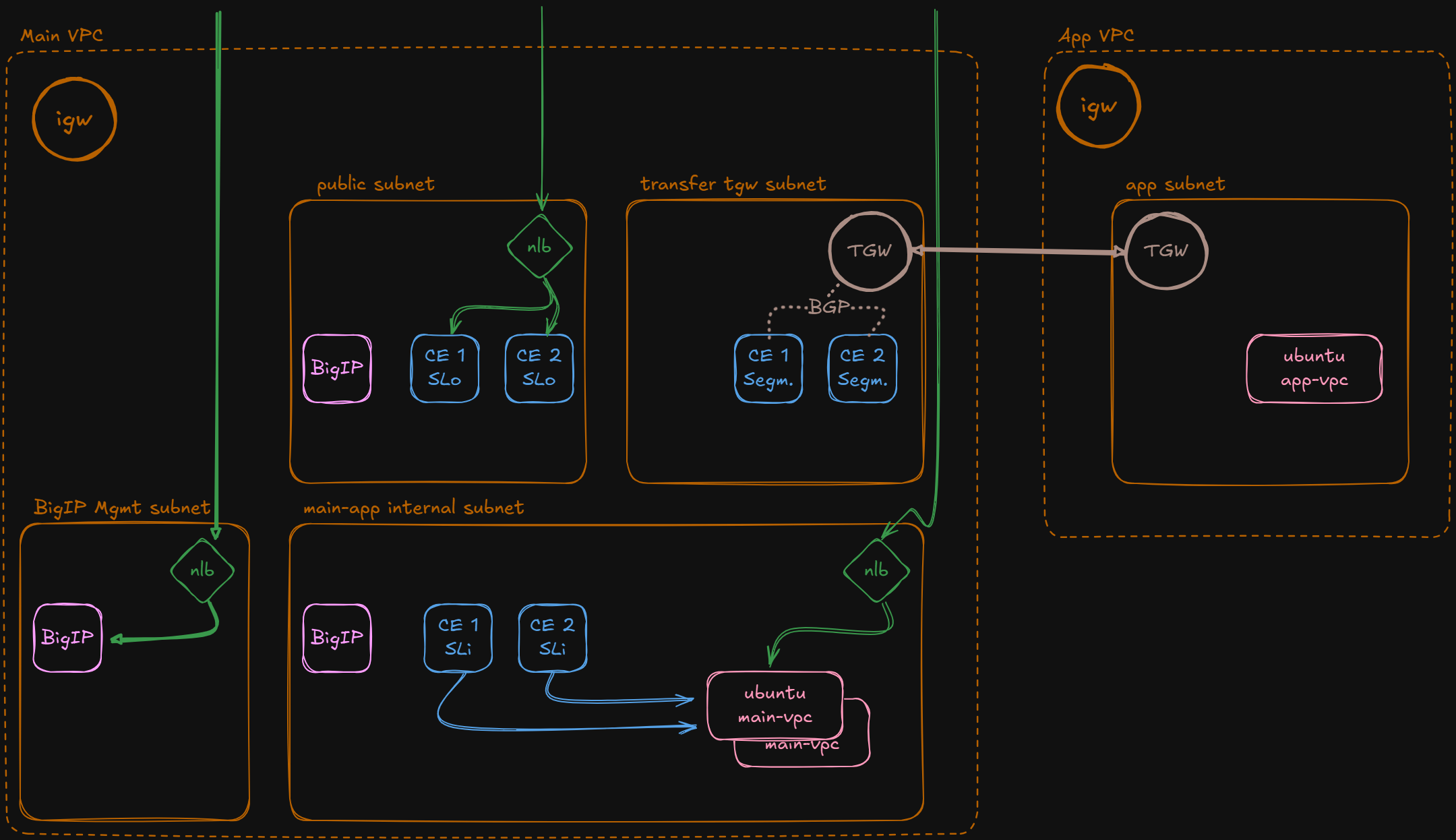
Use the sidebar to navigate through setup and each use case. A full overview is available under Use Cases.
Before You Start
This lab expects a local workstation with tools installed and a few credentials on hand.
Prerequisites
| Tool | Min Version | Purpose |
|---|---|---|
| Terraform | >= 1.0 | Infrastructure provisioning |
| Python 3 | >= 3.9 | Setup scripts, CA generation |
| yq | >= 4.x | YAML parsing in shell |
| envsubst | any | Template rendering in use cases |
| ssh | any | Remote access for service discovery |
| base64 | any | Kubeconfig encoding |
| curl | any | xC API calls |
| openssl | any | Certificate generation |
| git | any | Repository root detection |
Required Credentials
- AWS Access Key + Secret (and STS Token if temporary)
- xC Tenant name and Namespace
- xC API certificate (.p12) and password
[a-z0-9-], 1-16 chars, start/end alphanumeric.Basic Setup
Three steps: install OS tools, clone the repository, then set up a Python environment.
1. Install Tools
Linux (Ubuntu / Debian)
# Terraform
wget -O - https://apt.releases.hashicorp.com/gpg | sudo gpg --dearmor -o /usr/share/keyrings/hashicorp-archive-keyring.gpg
echo "deb [signed-by=/usr/share/keyrings/hashicorp-archive-keyring.gpg] https://apt.releases.hashicorp.com $(lsb_release -cs) main" | sudo tee /etc/apt/sources.list.d/hashicorp.list
sudo apt update && sudo apt install -y terraform

# Python 3 + pip
sudo apt install -y python3 python3-pip

# Tools
sudo apt install -y yq curl openssl git gettext-base
macOS
brew install terraform python yq curl openssl git gettext
gettext-base (Linux) / gettext (macOS) provides envsubst which is required by the use-case scripts.
2. Python Packages
Python dependencies are managed via requirements.txt in a virtual environment. This works the same on Linux and macOS.
Clone the repository
git clone https://github.com/de1chk1nd/xC-mcn-demo.git
cd xC-mcn-demo
Create venv and install dependencies
python3 -m venv .venv
source .venv/bin/activate
pip install -r requirements.txt
Use Cases Overview
- Domain suffix: __DOMAIN__
All automated use cases live under xC-use-cases/ and have setup.sh and delete.sh scripts.
| Use Case | Direction | Ingress | Egress | WAF |
|---|---|---|---|---|
| N-S RE only | North-South | RE | Internet | Yes |
| N-S RE to CE | North-South | RE | CE | Yes |
| N-S RE to CE via BigIP | North-South | RE | CE → BigIP | Yes |
| N-S CE via CLB | North-South | CE (CLB) | CE | Yes |
| E-W CE to CE | East-West | CE | CE (remote) | Yes |
| k8s Service Discovery | North-South | RE | CE → k8s | Yes |
| vk8s | North-South | RE | CE (vk8s) | Yes |
Lab Setup
This assumes you completed the Basic Setup (tools installed, repo cloned). If you are returning on a different day, start with Step 1 to re-activate your environment.
1. Activate Environment
Navigate into the repository and activate the Python virtual environment.
cd xC-mcn-demo
source .venv/bin/activate
2. Gather Credentials
You need two sets of credentials before configuring the lab.
F5 xC API Certificate
- Log in to the F5 Distributed Cloud Console.
- Navigate to Administration → Credentials → API Credentials.
- Create or download an API certificate (
.p12file). - Note the password you set during creation.
- Copy the file into the repository:
cp ~/Downloads/your-cert.p12 ./setup-init/.xC/AWS Credentials
Obtain temporary (STS) or static AWS credentials from your AWS account or lab portal:
aws_access_key_idaws_secret_access_keyaws_session_token(if using STS / temporary credentials)
3. Configure
Option A — Use the web-based config editor BETA
Fill in the form, click Download config.yaml, and save the file to setup-init/config.yaml.
Option B — Manual: copy the template and edit in your terminal:
cp ./setup-init/template/config.yaml ./setup-init/config.yaml
vim ./setup-init/config.yaml
Only 5 fields need to be filled in. Everything else is auto-detected, auto-derived, or has defaults.
| Section | Parameter | Description | |
|---|---|---|---|
| student | name | * | Your unique lab ID — drives DNS, certs, and resource naming |
email | * | Contact email for resource tagging | |
| xC | tenant | * | xC tenant name — API URL and short name are auto-derived |
namespace | * | xC namespace for all lab objects | |
p_12_pwd | * | Password for the P12 certificate |
* = mandatory. AWS credentials can be set in the file or via environment variables (AWS_ACCESS_KEY_ID, AWS_SECRET_ACCESS_KEY, AWS_SESSION_TOKEN). P12 certificate is auto-detected from the .xC/ directory. STS vs static credentials are auto-detected. See the full parameter reference for details.
__DOMAIN__) and is used in certificate names, xC object names, SSH key paths, and Route53 records. Choose it carefully — changing it later requires a full teardown and redeploy. Rules: lowercase letters, digits, and hyphens only ([a-z0-9-]), max 16 characters.
4. Deploy
./setup-init/bin/initialize.sh initThis will automatically:
- Detect your public IP
- Generate a Certificate Authority in
./setup-init/.cert/ca/ - Update AWS credentials in
~/.aws/credentials - Convert the xC P12 certificate to PEM
- Run Terraform (
fmt,init,plan,apply)
5. Post Install
Add local /etc/hosts entries and open SSH sessions to all lab servers.
Linux
Hostfile
terraform -chdir="./infrastructure" output -raw etc-hosts | xclip -sel clip
sudo vim /etc/hosts
SSH Access
chmod +x ./setup-init/.ssh/ssh-key-permission_lnx.sh
./setup-init/.ssh/ssh-key-permission_lnx.sh all
macOS
Hostfile
terraform -chdir="./infrastructure" output -raw etc-hosts | pbcopy
sudo vim /etc/hosts
SSH Access
chmod +x ./setup-init/.ssh/ssh-key-permission_mac.sh
./setup-init/.ssh/ssh-key-permission_mac.sh all
Appendix: Lab Setup Reference
Wait for Components
| Component | Estimated Time | How to verify |
|---|---|---|
| Terraform | 2-3 min | Script completes without errors |
| BIG-IP | 5-7 min | AS3 deploys pools and virtual servers |
| xC Gateways | 15-20 min | Check xC Console: gateways show online |
Device Access
| Device | FQDN | Username | Password |
|---|---|---|---|
| BIG-IP EU-Central | bigip-mgmt-eu-central-1.__DOMAIN__ |
admin |
DefaultLabPwd!2026 * |
| BIG-IP EU-West | bigip-mgmt-eu-west-1.__DOMAIN__ |
admin |
DefaultLabPwd!2026 * |
* Default password — verify the current value in setup-init/config.yaml → f5_password
Initialization Commands
| Command | Description |
|---|---|
./setup-init/bin/initialize.sh init | Full initialization: IP detection, CA, AWS credentials, xC cert, Anycast IP, Terraform deploy |
./setup-init/bin/initialize.sh update-creds | Update AWS credentials only (after STS token rotation) |
./setup-init/bin/initialize.sh update-ip | [BETA] Update public IP and refresh Security Groups (e.g. after VPN reconnect) |
./setup-init/bin/initialize.sh generate-ca | Generate Certificate Authority only (no Terraform, no AWS) |
Lab Deletion
When you are done with the lab, tear down all infrastructure and clean up local artifacts.
1. Update Credentials (if expired)
If your AWS credentials have expired since the initial setup, update config.yaml and run:
./setup-init/bin/initialize.sh update-creds2. Destroy Infrastructure
This will destroy all AWS resources, remove generated certificates, clean up the AWS profile, and reset auto-populated config values.
./setup-init/bin/delete.sh3. Remove /etc/hosts Entries
Manually remove the lab entries you added during post install:
sudo vim /etc/hosts- All Terraform-managed AWS infrastructure
- Generated xC PEM certificate (
.xC/xc-curl.crt.pem) - CA and domain certificates (
.cert/) - AWS credentials profile (
xc-mcn-lab) from~/.aws/credentials - Auto-populated values in
config.yaml(IP, CA paths)
North-South: RE Only
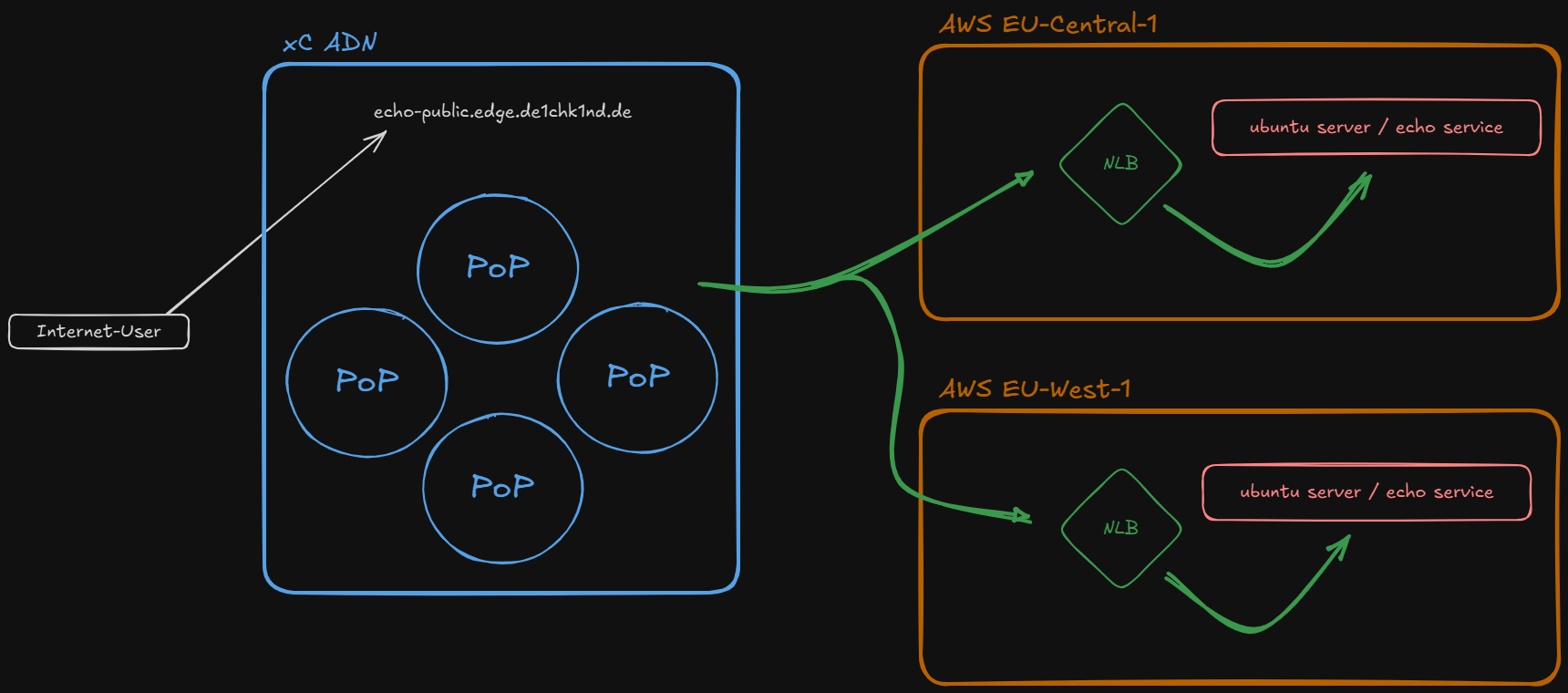
Create an HTTP load balancer with ingress and egress via Regional Edge (RE).
Egress goes directly via the Internet using DNS service discovery (FQDN) of AWS NLB names across EU-Central-1 and EU-West-1. A default Web Application Firewall policy is attached to the load balancer, guaranteeing common security policies and metrics across different environments.
Deploy
The script fetches NLB DNS names from Terraform outputs, generates origin pool and load balancer payloads from templates, and creates both objects via the xC API.
chmod +x "./xC-use-cases/Architecture/RE-only/bin/setup.sh"
"./xC-use-cases/Architecture/RE-only/bin/setup.sh"
Test
Access the load balancer FQDN and verify the hostname field in the JSON response. Load balancing alternates between eu-central-1 and eu-west-1.
Delete
Removes the HTTP load balancer, origin pool, and cleans up generated payload files.
chmod +x "./xC-use-cases/Architecture/RE-only/bin/delete.sh"
"./xC-use-cases/Architecture/RE-only/bin/delete.sh"
Appendix
North-South: RE to CE
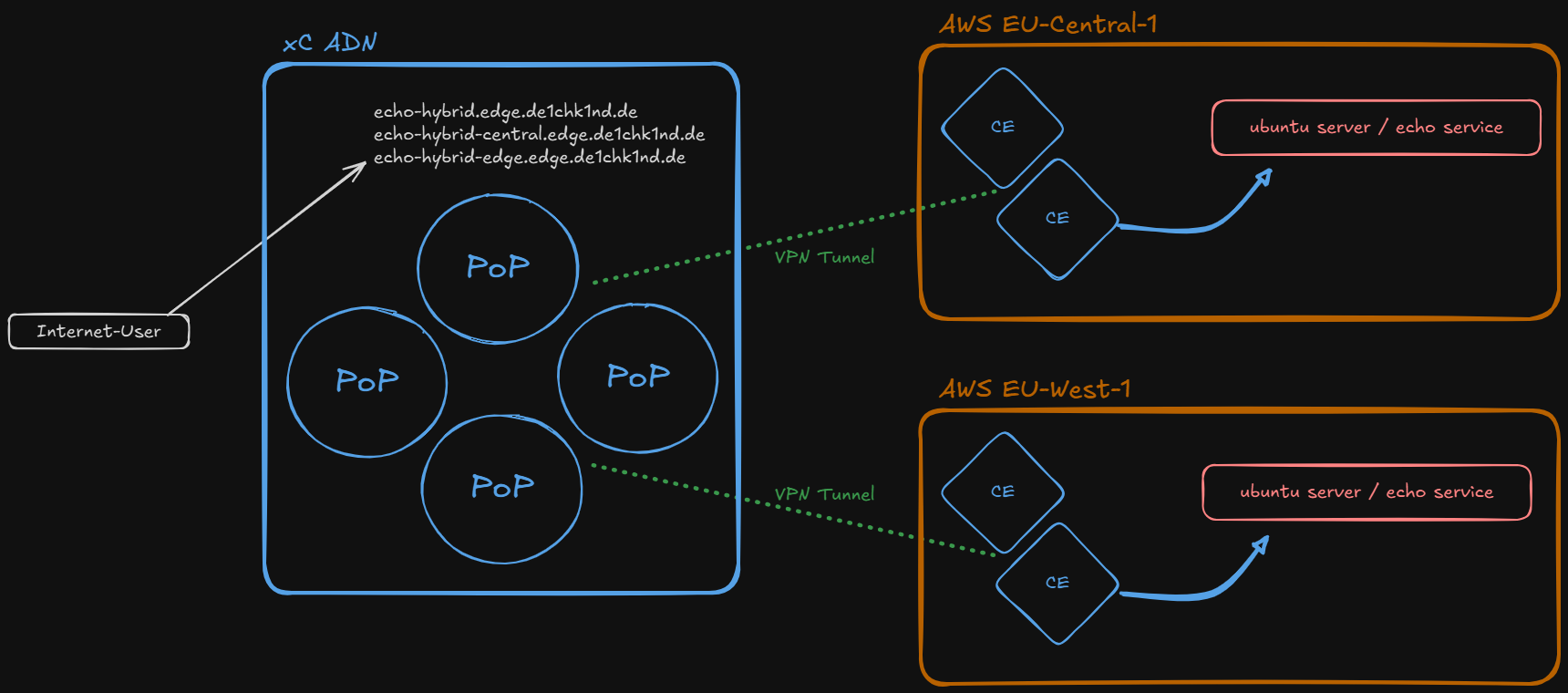
Create HTTP load balancers with ingress via Regional Edge (RE) and egress via Customer Edge (CE) on AWS.
Three load balancers are deployed: a combined LB routing to both regions, and one dedicated LB per region (eu-central, eu-west). A default Web Application Firewall policy is attached to each load balancer.
Deploy
The script generates server certificates for all three FQDNs, uploads them to xC, and creates the HTTP load balancers via the xC API.
chmod +x "./xC-use-cases/Architecture/RE-to-CE/bin/setup.sh"
"./xC-use-cases/Architecture/RE-to-CE/bin/setup.sh"
Test
Verify the hostname field in the JSON response. The regional LBs return servers from their region only, while the combined LB load balances across both regions.
Delete
Removes all three HTTP load balancers, certificates from xC, and cleans up generated files.
chmod +x "./xC-use-cases/Architecture/RE-to-CE/bin/delete.sh"
"./xC-use-cases/Architecture/RE-to-CE/bin/delete.sh"
Appendix
North-South: RE to CE via BIG-IP
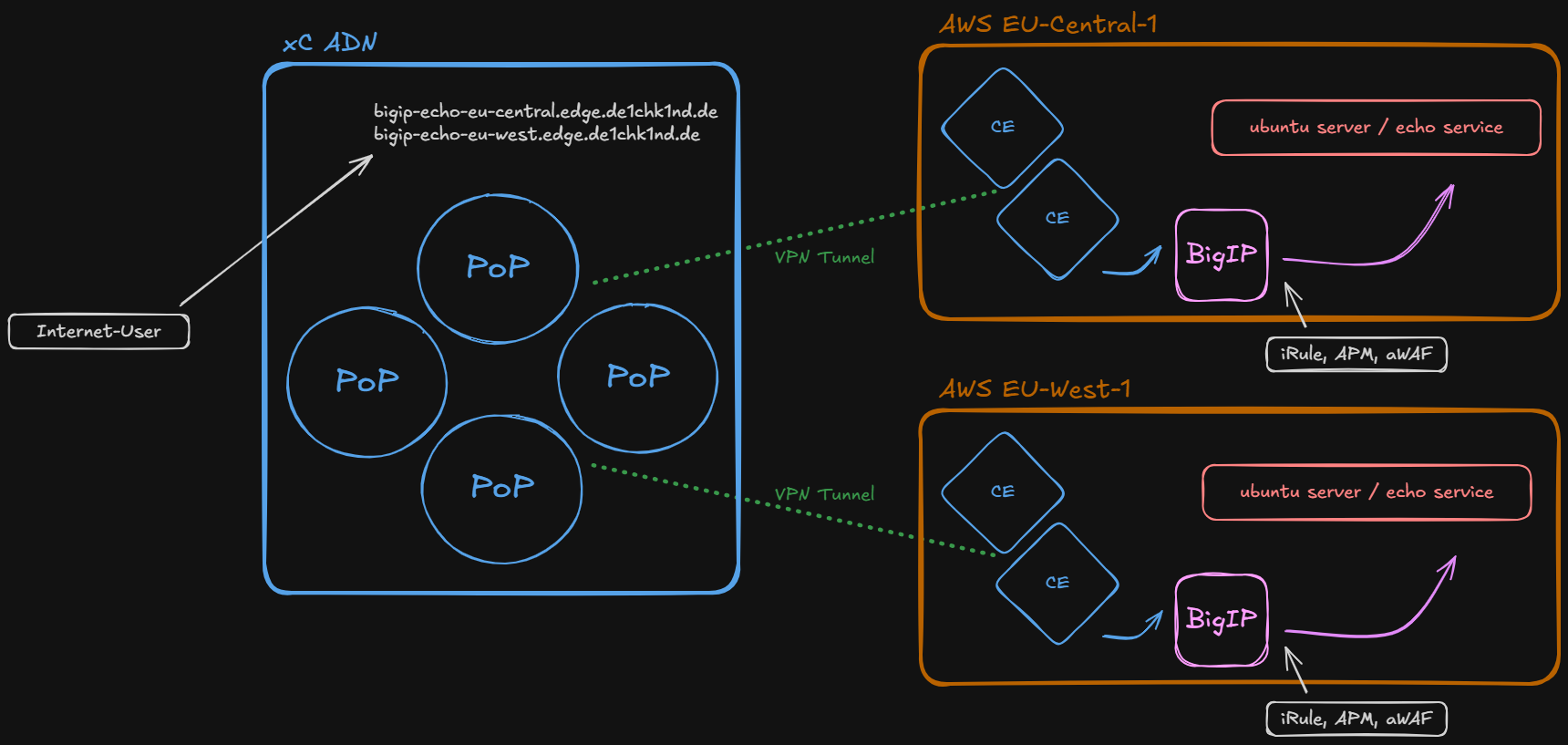
Create HTTP load balancers with ingress via Regional Edge (RE) and egress via Customer Edge (CE) on AWS, forwarding traffic to a local BIG-IP appliance. One load balancer per region, each pointing to the BIG-IP origin pool in its respective region.
A default Web Application Firewall policy is attached to each load balancer. The BIG-IP appliance injects a custom header via an iRule, demonstrating F5 "better together" integration.
Deploy
The script generates server certificates for both FQDNs, uploads them to xC, and creates the HTTP load balancers via the xC API.
chmod +x "./xC-use-cases/Architecture/RE-to-CE-bigip/bin/setup.sh"
"./xC-use-cases/Architecture/RE-to-CE-bigip/bin/setup.sh"
Test
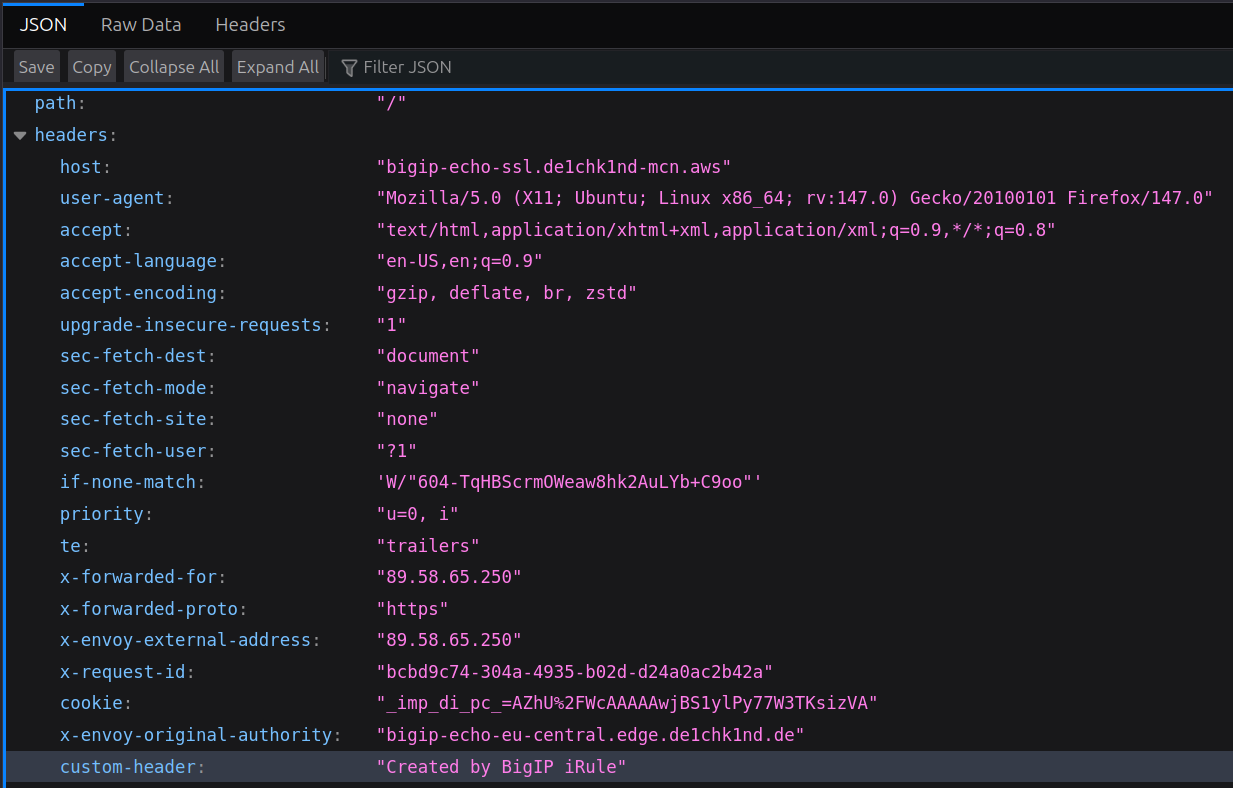
Access each FQDN and verify the JSON response. Since traffic passes through the BIG-IP, you should see a custom header injected by a BIG-IP iRule in the response.
iRule Custom Header
The BIG-IP iRule adds a custom header to every response. Look for the additional header entry in the JSON output:
Delete
Removes both HTTP load balancers, certificates from xC, and cleans up generated files.
chmod +x "./xC-use-cases/Architecture/RE-to-CE-bigip/bin/delete.sh"
"./xC-use-cases/Architecture/RE-to-CE-bigip/bin/delete.sh"
Appendix: BIG-IP APM Local Authentication
Add an APM access policy with local user authentication on the eu-central BIG-IP. This demonstrates how BIG-IP APM can enforce authentication in front of application workloads, even when traffic is routed through the xC fabric.
BIG-IP Management Access
| Device | FQDN | Username | Password |
|---|---|---|---|
| BIG-IP EU-Central | bigip-mgmt-eu-central-1.__DOMAIN__ |
admin |
DefaultLabPwd!2026 * |
| BIG-IP EU-West | bigip-mgmt-eu-west-1.__DOMAIN__ |
admin |
DefaultLabPwd!2026 * |
* Default password — verify the current value in setup-init/config.yaml → f5_password
Step 1: Create Local User Database
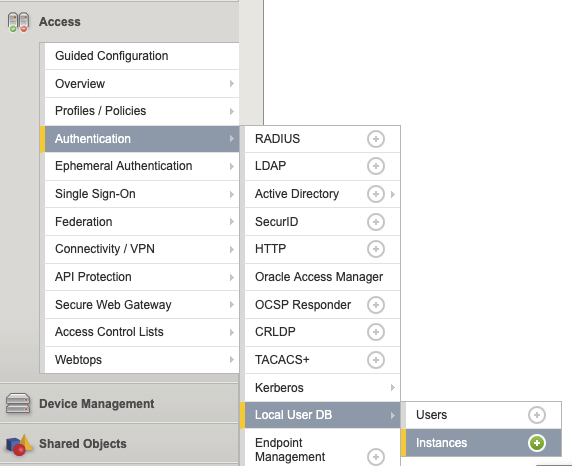
Navigate to Access → Authentication → Local User DB → Instances and create a new instance local-user-db.
Step 2: Create a User
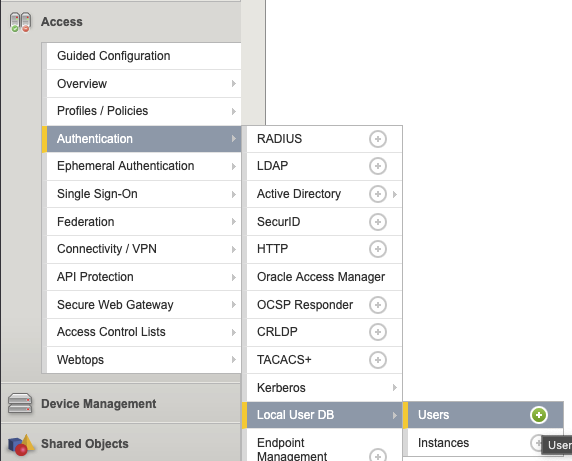
Add a user to the local database: username alice, password of your choice, instance local-user-db.
Step 3: Create Access Profile
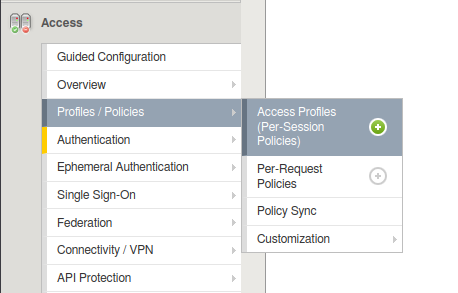
Navigate to Access → Profiles / Policies → Access Profiles and create a new profile local-auth (type: All, language: English).
Step 4: Edit Access Policy
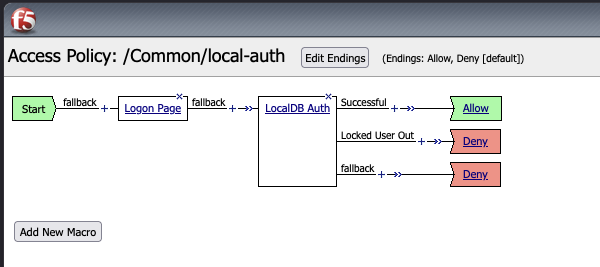
Open the Visual Policy Editor and configure the flow:
Start → Login Page → LocalDB Auth (instance local-user-db) → Allow
Click Apply Access Policy when done.
Step 5: Assign Policy to Virtual Server
Switch to partition xcmcnlab, then assign the local-auth access profile to the virtual server echo443tlspass.
Step 6: Test Authentication
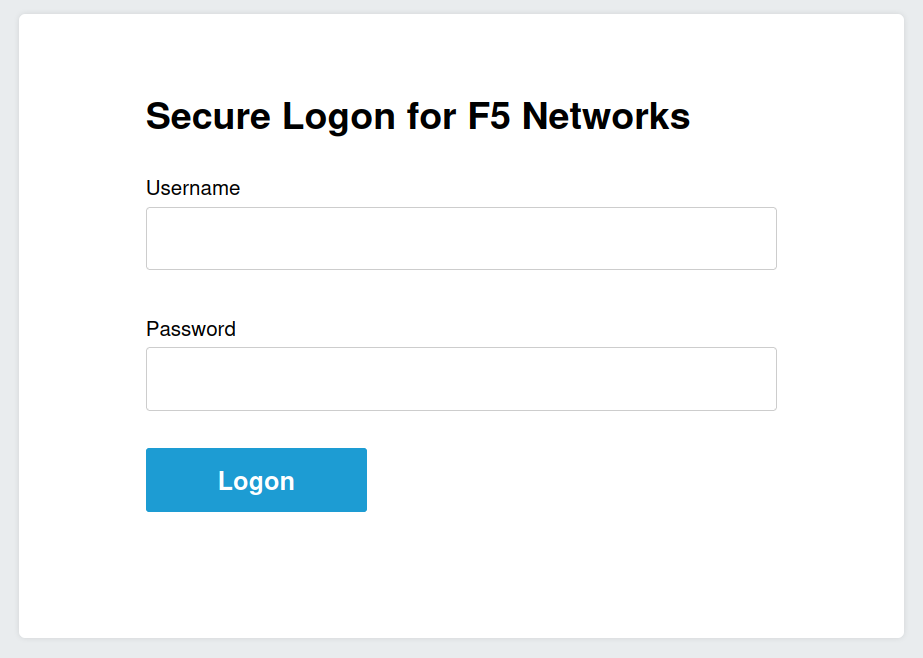
Access the FQDN again. An authentication prompt should appear. Log in with the user alice you created earlier.
Appendix
North-South: CE via Cloud Load Balancer
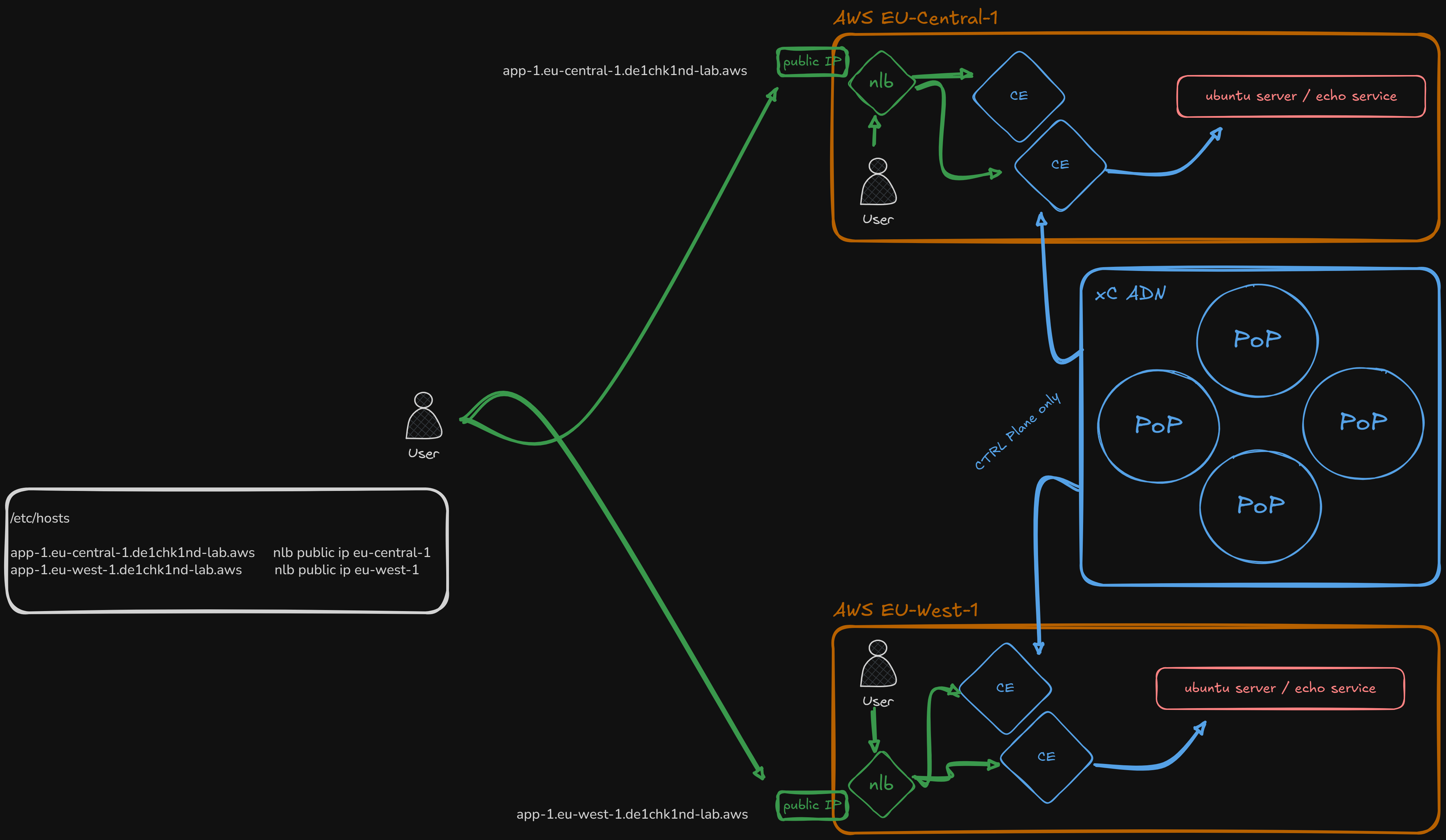
Create HTTPS load balancers that are advertised directly on the Customer Edge (CE) rather than on the Regional Edge. Traffic never leaves the local region and does not traverse the global F5 network.
An AWS Network Load Balancer (NLB) in each region forwards external traffic to the CE node. A default Web Application Firewall policy is attached, providing SaaS-managed WAAP at the edge without requiring a Regional Edge.
Deploy
The script generates server certificates, uploads them to xC, and creates one HTTPS load balancer per region, each advertised on the CE virtual site in its respective region.
chmod +x "./xC-use-cases/Architecture/CE-via-CLB/bin/setup.sh"
"./xC-use-cases/Architecture/CE-via-CLB/bin/setup.sh"
Test — External (via NLB)
External clients reach the application through the AWS NLB, which forwards traffic to the CE node. The CE terminates the TLS session and applies the WAF policy locally. Requires local /etc/hosts entries (see Post Install).
Test — Internal (via SSH)
Because the load balancer is advertised on the CE node itself (not on the Regional Edge), any host inside the same VPC can reach it directly by resolving the FQDN to the CE’s local IP address. This means the same WAF policy protects both external and internal traffic without any additional configuration.
This is a key advantage of CE-based load balancers: a single deployment covers two scenarios at once:
- External → CE: Internet clients reach the app via the NLB, which NATs to the CE address. The CE terminates TLS, applies the WAF, and forwards to the origin.
- Internal → CE: Local servers (e.g. Ubuntu web servers) resolve the same FQDN to the CE directly. Every internal request also passes through the xC WAF — no separate internal load balancer or policy is needed.
SSH into any Ubuntu server in the respective region and test. If you have not imported the lab CA, skip TLS verification with -k:
# From eu-central Ubuntu server
curl --silent -k https://app-ce-eu-central-1.__DOMAIN__ | grep "Server address"
curl --silent -k "https://app-ce-eu-central-1.__DOMAIN__?a=<script>"

# From eu-west Ubuntu server
curl --silent -k https://app-ce-eu-west-1.__DOMAIN__ | grep "Server address"
curl --silent -k "https://app-ce-eu-west-1.__DOMAIN__?a=<script>"
Delete
Removes both HTTPS load balancers, certificates from xC, and cleans up generated files.
chmod +x "./xC-use-cases/Architecture/CE-via-CLB/bin/delete.sh"
"./xC-use-cases/Architecture/CE-via-CLB/bin/delete.sh"
Appendix
East-West: CE to CE
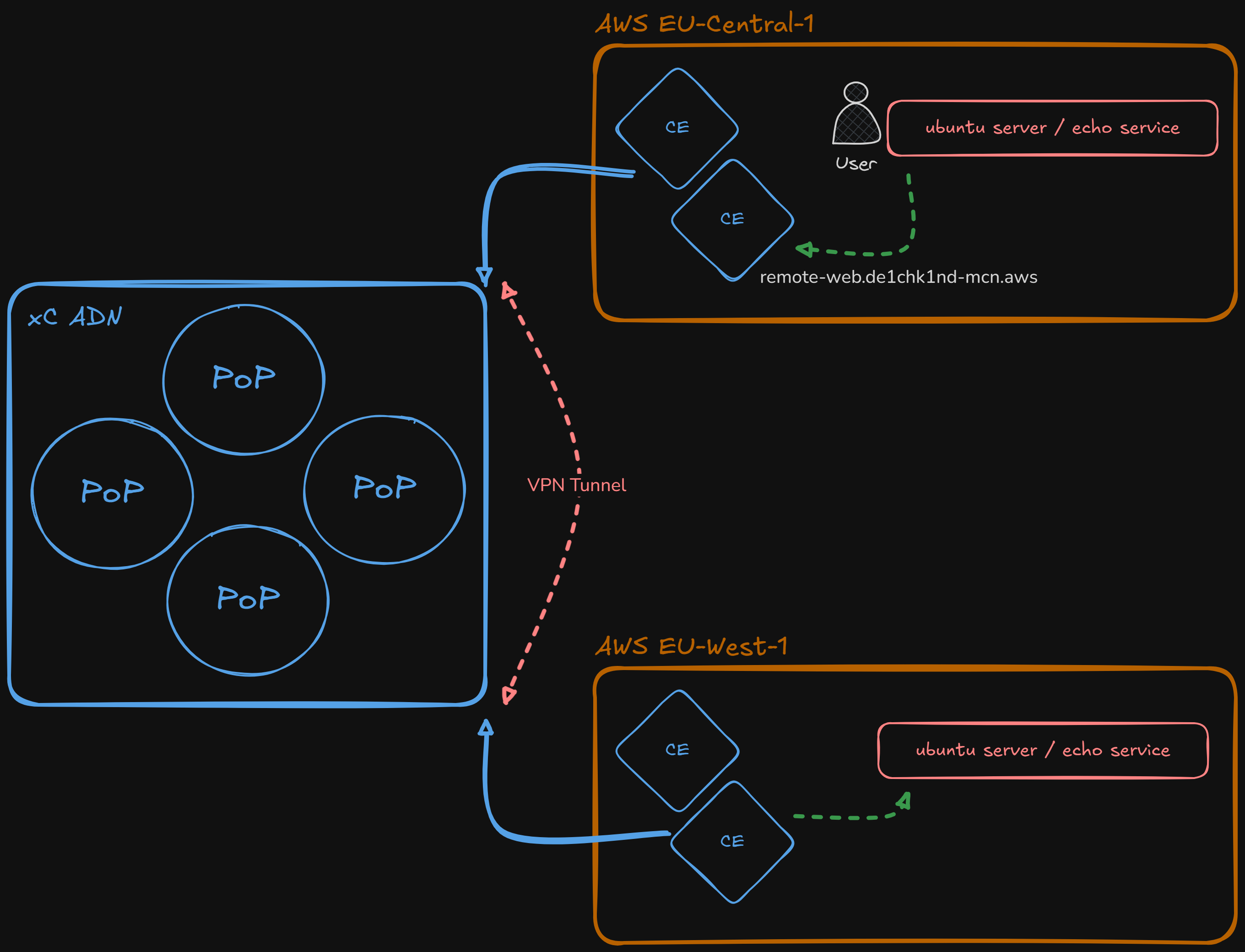
Create internal HTTPS load balancers for cross-region east-west traffic between Customer Edge sites. Each region gets an LB that routes to the opposite region’s origin pool.
No VPC peering or Transit Gateway is required — connectivity is provided entirely by the xC fabric. Both load balancers share the same FQDN (remote-web) but are advertised on different CE virtual sites, so each region resolves the name to its local CE and gets routed to the remote origin. A default Web Application Firewall policy is attached.
Deploy
The script generates a server certificate for the shared FQDN, uploads it to xC, and creates two HTTPS load balancers (one per region, each pointing to the opposite region’s origin pool).
chmod +x "./xC-use-cases/Architecture/CE-to-CE/bin/setup.sh"
"./xC-use-cases/Architecture/CE-to-CE/bin/setup.sh"
Test
SSH into an Ubuntu server and curl the internal LB. The response should come from the opposite region, proving cross-region connectivity via the xC fabric:
# From eu-central: response should come from eu-west
curl -k --silent https://remote-web.__DOMAIN__ | grep "Server name"

# From eu-west: response should come from eu-central
curl -k --silent https://remote-web.__DOMAIN__ | grep "Server name"

# WAF test -- should be blocked
curl -k --silent "https://remote-web.__DOMAIN__?a=<script>"| SSH into | LB Name | Traffic Flow | Response from |
|---|---|---|---|
| EU-Central-1 | lb-api-int-central |
Central ➔ West | EU-West-1 NGINX |
| EU-West-1 | lb-api-int-west |
West ➔ Central | EU-Central-1 NGINX |
remote-web.__DOMAIN__, but each is advertised only on the CE virtual site in its own region (SITE_NETWORK_INSIDE). When an Ubuntu server in eu-central resolves the FQDN, it reaches the local CE, which routes the request through the xC fabric to the origin pool in eu-west — and vice versa. This enables secure cross-region connectivity without any direct VPC peering.
Delete
Removes both HTTPS load balancers, the certificate from xC, and cleans up generated files.
chmod +x "./xC-use-cases/Architecture/CE-to-CE/bin/delete.sh"
"./xC-use-cases/Architecture/CE-to-CE/bin/delete.sh"
Appendix
East-West: Network Connect (L3 VPN)
Establishes a full L3 VPN tunnel between both AWS sites using xC segments.
Steps
- Create a Segment:
__STUDENT__-global-vrf - Go to Multi-Cloud Network Connect → Site Management → Customer Edges → your CE → Manage
- On interface
ens6, change VRF from SITE LOCAL INSIDE to Segment (Global VRF) and select the segment. Repeat for both GW01 (eu-west and eu-central). - Check CE Routes
- Test access
Delete
Change interface setting back to SITE_LOCAL_INSIDE.
k8s Service Discovery
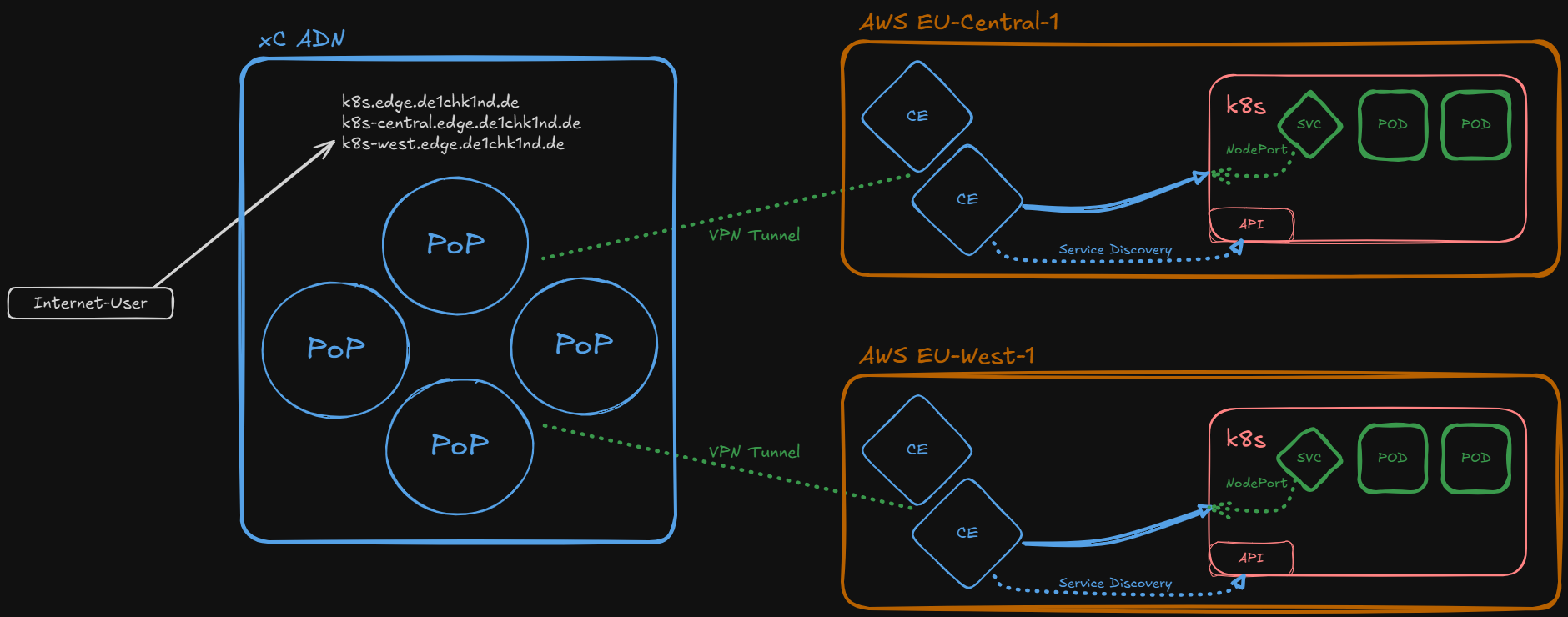
Create Kubernetes service discovery objects for minikube clusters running on CE sites. The setup script SSHs into each Ubuntu server, fetches the kubeconfig, deploys an echo application, and registers service discovery objects, origin pools, and HTTPS load balancers with the xC API.
Three load balancers are deployed: one per region and one combined LB routing to both. A default Web Application Firewall policy is attached to each load balancer.
Deploy
The script generates server certificates for all three FQDNs, uploads them to xC, fetches kubeconfigs via SSH, deploys the echo app to both minikube clusters, then creates service discovery objects, origin pools, and load balancers.
chmod +x "./xC-use-cases/Architecture/k8s-service-discovery/bin/setup.sh"
"./xC-use-cases/Architecture/k8s-service-discovery/bin/setup.sh"
Test
Access each FQDN and verify the response. The regional LBs return pods from their region only, while the combined LB distributes across both.
Delete
Removes all three load balancers, origin pools, service discovery objects, certificates from xC, and cleans up generated files.
chmod +x "./xC-use-cases/Architecture/k8s-service-discovery/bin/delete.sh"
"./xC-use-cases/Architecture/k8s-service-discovery/bin/delete.sh"
Appendix: k8s Service Discovery Reference
Further Reading
| Resource | Notes |
|---|---|
| K8s Architecture Options | General k8s options — focus on Secure k8s Gateway |
| SD kubeconfig | How to create kubeconfig for cloud providers |
| SD k8s RBAC | Create kubeconfig with RBAC |
Service Discovery: BIG-IP
BIG-IP Access
| Device | FQDN | Username | Password |
|---|---|---|---|
| BIG-IP EU-Central | bigip-mgmt-eu-central-1.__DOMAIN__ |
admin |
DefaultLabPwd!2026 * |
| BIG-IP EU-West | bigip-mgmt-eu-west-1.__DOMAIN__ |
admin |
DefaultLabPwd!2026 * |
* Default password — verify the current value in setup-init/config.yaml → f5_password
Create Service Discovery
EU-Central
- Name:
sd-bigip-__STUDENT__-central - Site:
system/__STUDENT__-****-aws-eu-central-1 - Type: Site Local Network
EU-West
- Name:
sd-bigip-__STUDENT__-west - Site:
system/__STUDENT__-****-aws-eu-west-1 - Type: Site Local Network
Edge Computing: vk8s
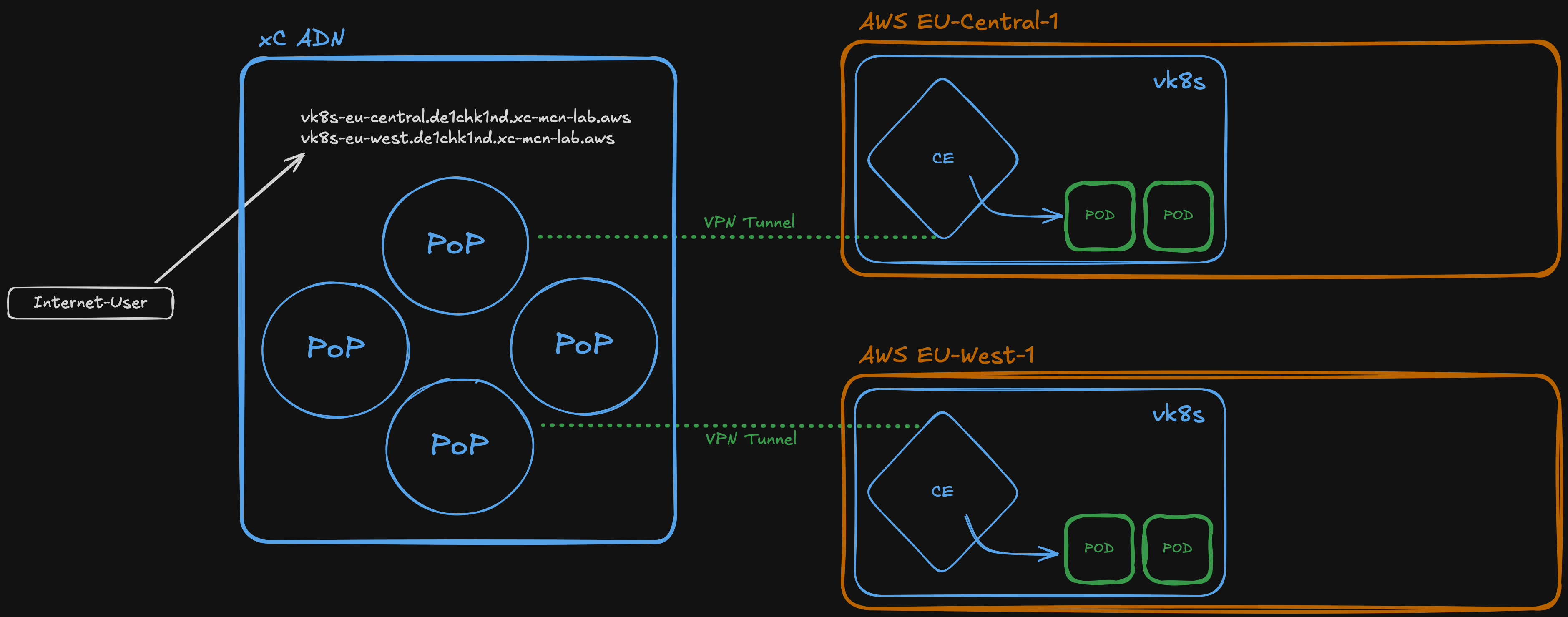
Deploy container workloads to CE sites using F5 xC virtual Kubernetes (vk8s). Pods run directly on Customer Edge nodes without requiring a separate Kubernetes cluster.
The setup script creates a vk8s cluster via Terraform, deploys an echo-aws workload to both CE sites, creates origin pools and HTTPS load balancers. A default Web Application Firewall policy is attached to each load balancer.
Deploy
The script creates the vk8s cluster via xC API, generates server certificates, uploads them to xC, deploys the echo-aws workload, and creates origin pools and load balancers.
chmod +x ./xC-use-cases/Architecture/vk8s/bin/setup.sh
./xC-use-cases/Architecture/vk8s/bin/setup.sh
Test
Access each FQDN and verify the response comes from a vk8s pod running on the respective CE site.
Delete
Removes load balancers, origin pools, workload, vk8s cluster, and certificates from xC, and cleans up generated files.
chmod +x ./xC-use-cases/Architecture/vk8s/bin/delete.sh
./xC-use-cases/Architecture/vk8s/bin/delete.sh
Appendix: vk8s Reference
Services Overview
- Domain suffix: __DOMAIN__
xC platform services that can be applied across all use cases. Each service section includes configuration steps and test instructions.
| Service | Category | Status | Description |
|---|---|---|---|
| JWT Validation | API Security | Active | JWT token validation (RS256, blocking mode) on xC HTTP load balancers |
| TLS Authentication | Security | Active | mTLS client authentication with certificate header injection |
TLS Authentication (mTLS)
Create an HTTPS load balancer with mutual TLS (mTLS) authentication. Clients must present a valid client certificate signed by the lab CA to access the application. The load balancer extracts certificate fields and injects them as HTTP headers.
Deploy
The script generates a server certificate, creates client certificates for two test users (alice@mordor.de and bob@shire.de), uploads the server cert to xC, and creates the HTTP load balancer with mTLS enabled.
chmod +x "./xC-use-cases/Services/tls-authentication/bin/setup.sh"
"./xC-use-cases/Services/tls-authentication/bin/setup.sh"
Test
Access the load balancer with a client certificate. The JSON response should include the injected x-client-cert-* headers showing the client’s identity.
curl — Alice (alice@mordor.de)
curl -vk \
  --cert "./xC-use-cases/Services/tls-authentication/etc/client-certs/alice-mordor-de.cert" \
  --key  "./xC-use-cases/Services/tls-authentication/etc/client-certs/alice-mordor-de.key" \
  https://mtls.__DOMAIN__
curl — Bob (bob@shire.de)
curl -vk \
  --cert "./xC-use-cases/Services/tls-authentication/etc/client-certs/bob-shire-de.cert" \
  --key  "./xC-use-cases/Services/tls-authentication/etc/client-certs/bob-shire-de.key" \
  https://mtls.__DOMAIN__
curl — Without client cert (should fail)
curl -vk https://mtls.__DOMAIN__This request should be rejected by the load balancer with a TLS handshake error, since no client certificate is presented.
--cert and --key paths accordingly. The client certs are stored in xC-use-cases/Services/tls-authentication/etc/client-certs/.
Expected Response
When using a valid client cert, the JSON echo response should contain an x-forwarded-client-cert (XFCC) header injected by the load balancer. This header contains the client certificate details:
| XFCC Element | Content |
|---|---|
Cert | URL-encoded client certificate |
Chain | URL-encoded certificate chain |
Subject | Client cert subject DN (e.g. CN=alice@mordor.de,OU=de1chk1nd,O=xC-MCN-Lab) |
URI | SAN URI if present |
DNS | SAN DNS if present |
Look for the x-forwarded-client-cert header in the JSON response to verify the client identity was passed through.
Delete
Removes the HTTP load balancer, server certificate, trusted CA list from xC, and cleans up all generated files including client certificates.
chmod +x "./xC-use-cases/Services/tls-authentication/bin/delete.sh"
"./xC-use-cases/Services/tls-authentication/bin/delete.sh"
Appendix
Certificate-Based Access Control with Service Policies
After mTLS authentication, the load balancer injects the x-forwarded-client-cert (XFCC) header containing the client certificate details. You can use xC Service Policies to enforce access control based on these certificate fields.
The setup script creates a service policy sp-${STUDENT}-mtls-cert-check that demonstrates this pattern:
- Rule 1 (Deny): If the XFCC header does not match
CN=...@mordor.de→ block the request (403) - Rule 2 (Allow): Everything else (i.e.
@mordor.deusers) → allow
lb-mtls in the xC Console: HTTP Load Balancer → Edit → Common Security Controls → Service Policies.
The key insight is that Service Policies evaluate after the mTLS handshake and header injection. This means you can use standard header matching (regex, exact, invert) on the XFCC Subject field to implement fine-grained access control based on client certificate attributes like CN, OU, O, or email.
Regex Pattern
xC uses RE2 regex syntax. The pattern used in this lab:
CN=[^,]*@mordor\.deThis matches any XFCC header where the CN field ends with @mordor.de. Combined with invert_matcher: true, it denies all requests where this pattern does not match.
JWT Validation
Create an HTTPS load balancer with JWT validation in blocking mode. Requests must include a valid Authorization: Bearer <token> header. The JWT is signed with RS256 using the lab CA private key, and the load balancer validates it against an inline JWKS.
Deploy
The script generates a server certificate, creates two JWT tokens (valid + invalid), extracts the JWKS from the CA public key, and deploys the HTTP load balancer with JWT validation in blocking mode.
chmod +x "./xC-use-cases/Services/jwt-validation/bin/setup.sh"
"./xC-use-cases/Services/jwt-validation/bin/setup.sh"
Test
Three test scenarios demonstrate the JWT validation behavior:
Test 1: No token (should be blocked)
curl -vk https://jwt.__DOMAIN__Expected: 401 Unauthorized — no JWT provided, request is rejected.
Test 2: Valid token (should pass)
curl -vk \
  -H "Authorization: Bearer $(cat ./xC-use-cases/Services/jwt-validation/etc/tokens/valid.jwt)" \
  https://jwt.__DOMAIN__
Expected: 200 OK — valid issuer, audience, and signature. The echo response should show the full request details.
Test 3: Invalid claim (should be blocked)
curl -vk \
  -H "Authorization: Bearer $(cat ./xC-use-cases/Services/jwt-validation/etc/tokens/invalid.jwt)" \
  https://jwt.__DOMAIN__
Expected: 401/403 — the token is cryptographically valid (signed by the same CA), but the issuer claim (https://evil.attacker.com) does not match the expected value. The load balancer rejects the request based on claims validation.
jwt_validation in blocking mode. It extracts the Bearer token from the Authorization header, validates the RS256 signature against the inline JWKS, and checks that the iss (issuer) and aud (audience) claims match the expected values. Mandatory claims are iss, aud, sub, and exp.
JWT Claims Reference
| Claim | Valid Token | Invalid Token |
|---|---|---|
iss | https://lab.__DOMAIN__ | https://evil.attacker.com |
aud | https://jwt.__DOMAIN__ | https://jwt.__DOMAIN__ |
sub | __STUDENT__@xc-mcn-lab | attacker@evil.com |
Delete
Removes the HTTP load balancer, server certificate from xC, and cleans up all generated files including JWT tokens and JWKS.
chmod +x "./xC-use-cases/Services/jwt-validation/bin/delete.sh"
"./xC-use-cases/Services/jwt-validation/bin/delete.sh"
Appendix
Work in Progress
The following use cases are planned or in early development and not yet part of the guided lab.
| Use Case | Category | Status | Notes |
|---|---|---|---|
| Network Connect (L3 VPN) | East-West | Idea | Routing limited to GW01-to-GW01 CE nodes |
| BIG-IP Service Discovery | Service Discovery | Idea | Automatic endpoint discovery from BIG-IP |
| BGP Anycast Routing | Networking | Evaluating | BGP peering with CE nodes via FRR |
| Web Application Scan | Security | Idea | Automated vulnerability scanning (Juice Shop) |
TL;DR — Quick Setup
1. Clone & Prepare
git clone https://github.com/de1chk1nd/xC-mcn-demo.git
cd xC-mcn-demo
python3 -m venv .venv
source .venv/bin/activate
pip install -r requirements.txt
2. Config
Use the Config Editor (BETA) or manual:
cp ./setup-init/template/config.yaml ./setup-init/config.yaml
vim ./setup-init/config.yaml
3. Deploy
./setup-init/bin/initialize.sh init4. Post Install
Linux
terraform -chdir="./infrastructure" output -raw etc-hosts | xclip -sel clip
sudo vim /etc/hosts
chmod +x ./setup-init/.ssh/ssh-key-permission_lnx.sh
./setup-init/.ssh/ssh-key-permission_lnx.sh all
macOS
terraform -chdir="./infrastructure" output -raw etc-hosts | pbcopy
sudo vim /etc/hosts
chmod +x ./setup-init/.ssh/ssh-key-permission_mac.sh
./setup-init/.ssh/ssh-key-permission_mac.sh all
TL;DR — Teardown
Update Credentials (after STS rotation)
./setup-init/bin/initialize.sh update-credsUpdate Public IP (after VPN reconnect)
./setup-init/bin/initialize.sh update-ipDestroy
# Update expired creds first
./setup-init/bin/initialize.sh update-creds

# Destroy infrastructure
./setup-init/bin/delete.sh

# Remove /etc/hosts entries
sudo vim /etc/hosts